Introduction
Most AI agents behave like a blank slate every time a new session starts: they forget what they already worked through, repeat the same trial-and-error, and never truly "learn" from prior interactions. Hermes Agent, an open-source project from Nous Research, was built specifically to address that gap. Its core claim is simple but ambitious: it's an agent with a built-in learning loop — one that creates skills from experience, improves those skills through use, and builds a deepening model of its user across sessions.
For developers who have spent time building custom agents on top of frameworks like LangChain and kept ending up patching their own memory layer, Hermes is appealing because much of that groundwork is already solved out of the box: persistent memory, growing skills, support for a wide range of model providers, and messaging integration into Telegram, Discord, Slack, WhatsApp, and Signal, all through a single gateway process.
The Learning Loop Concept: Turning Experience Into Skills
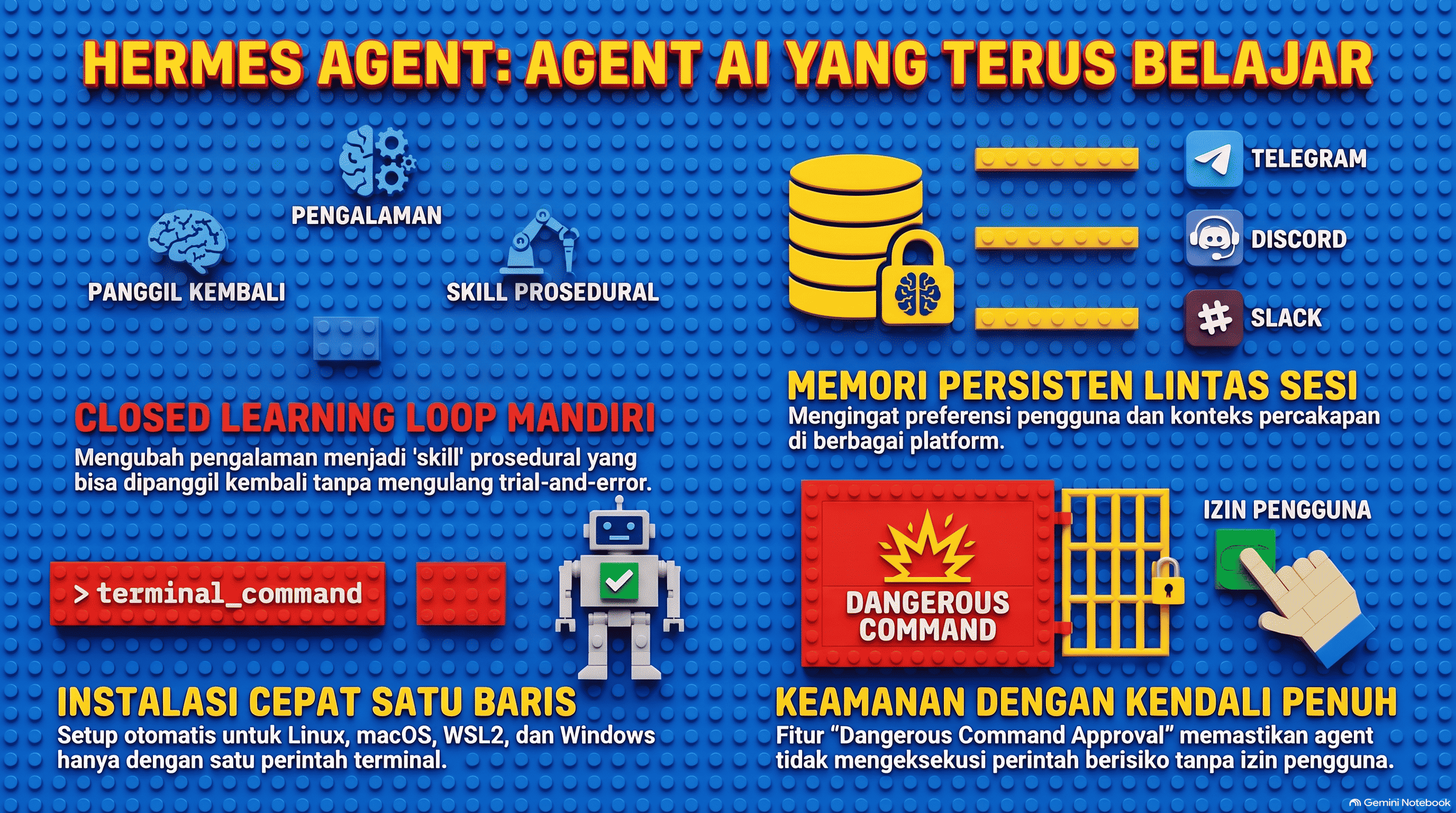
What sets Hermes apart from a typical agent is its closed learning loop. The flow works roughly like this: the agent completes a task, and after a sufficiently complex piece of work, it autonomously reflects on what worked and what it had to improvise along the way. That reflection gets rewritten into a new skill — a form of procedural memory that can be called on again in a later session instead of relearning the same trial-and-error from scratch.
Crucially, these skills aren't static. They keep getting refined through use, so performance on recurring tasks tends to improve over time rather than plateau. Alongside skills, Hermes also runs agent-curated memory with periodic nudges, prompting the agent to actively save important information rather than passively waiting to be told. It includes FTS5-based session search with LLM summarization for cross-session recall, and dialectic user modeling through an integration with Honcho to build an evolving understanding of who the user actually is. The skill system is also compatible with the open agentskills.io standard, meaning skills can in principle be shared across other agents that support the same format.
Installation via the Installer Script and Verification with hermes doctor
Hermes is designed to be up and running in a couple of minutes. On Linux, macOS, WSL2, and Android (via Termux), it's a single command:
curl -fsSL https://hermes-agent.nousresearch.com/install.sh | bash
On native Windows, run this in PowerShell:
iex (irm https://hermes-agent.nousresearch.com/install.ps1)
The installer handles all dependencies automatically: uv (a fast Python package manager), Python 3.11, Node.js, ripgrep, ffmpeg, plus the repo clone and virtual environment setup. Prerequisites on the user's side are minimal — on non-Windows platforms, all that's really required is Git, curl, and xz-utils. Once installation finishes, reload your shell and start chatting:
source ~/.bashrc    # or: source ~/.zshrc
hermes
Where things get installed depends on the mode: a per-user install (the standard git installer) places code under ~/.hermes/hermes-agent/ with the binary symlinked at ~/.local/bin/hermes, while a root-mode install uses an FHS layout under /usr/local/lib/hermes-agent/, with data living in /root/.hermes/ or a custom $HERMES_HOME. That FHS layout is intended for shared-machine deployments where a single system-wide install serves multiple users.
After installing, run hermes doctor to confirm everything is wired up correctly. This command diagnoses common issues — from hermes: command not found (usually a PATH that hasn't been reloaded), to a missing API key, to configuration that goes stale after an update. hermes doctor also reports the detected install method (pip, the git installer, Homebrew, or NixOS) as part of its environment summary.
Configuring a Profile: config.yaml, SOUL.md, and Persistent Memory Storage
Once installed, the next step is the setup wizard:
hermes setup
Or, if you'd rather use Nous Portal (one subscription covering 300+ models plus a Tool Gateway for web search, image generation, TTS, and a cloud browser):
hermes setup --portal
The agent's data directory (~/.hermes/ by default) holds several key files that make up its "profile":
config.yaml— the main configuration: default model, terminal backend, approval mode, and other options. Managed viahermes config edit,hermes config set KEY VAL,hermes config check, andhermes config migrate..env— API keys and secrets (e.g.OPENROUTER_API_KEY).SOUL.md— the agent's global persona, loaded in full into every session on every channel. This is where you define who the agent is, what it does, and how it responds.memories/— persistent memory (MEMORY.md,USER.md) that acts as the agent's notepad: your name, preferences, things you've previously mentioned.skills/— skills the agent has created for itself, managed through theskill_managetool.
Hermes also supports multiple profiles via hermes profile create <name>, which automatically creates a new command alias (for example coder chat, coder setup). Each profile gets its own config.yaml, .env, SOUL.md, memory, sessions, and skills — useful for running several separate agents (a coding assistant, a personal bot, a research agent) without their state bleeding into each other.
The Skill and Context File System That Shapes Behavior Across Sessions
If memory answers the question of what the agent knows, skills answer how it acts. A skill is a unit of procedural memory — concrete steps that have already been proven to work for a given task, so they don't need to be reinvented every time. Skills can be browsed directly from the CLI with /skills, or invoked directly with /<skill-name>.
Beyond skills, Hermes also supports context files: project-level context that shapes every conversation, similar in spirit to the AGENTS.md convention already familiar from the coding-agent ecosystem. It's the combination of SOUL.md (identity), memory (knowledge), skills (procedure), and context files (project context) that keeps the agent's behavior consistent across sessions — even across platforms, since a single gateway process serves both the CLI and every connected messaging channel.
Here's a quick reference of some of the relevant CLI commands for managing configuration and skills:
| Command | Purpose |
|---|---|
hermes model |
Choose your LLM provider and model |
hermes tools |
Configure which tools are enabled |
hermes config edit |
Open config.yaml directly in your editor |
hermes gateway setup |
Set up messaging platform integrations |
hermes doctor |
Diagnose installation and config issues |
Security Notes: System Access Needs Explicit Permission and Isolation
Because Hermes can execute terminal commands, edit files, and interact across multiple messaging channels at once, its security model is worth understanding before putting it to serious use. The core assumption is that Hermes is a personal agent with a single trusted operator. It's designed to protect the operator from mistaken LLM actions, not to protect against malicious co-tenants — multi-user isolation has to be handled at the OS or host level.
There are two core security mechanisms developers should be aware of:
- Dangerous command approval — terminal commands, file operations, and other potentially destructive actions are gated behind explicit user confirmation before they execute. This approval mode is controlled by
approvals.modeinconfig.yaml, withonas the default, meaning the agent will prompt for approval on risky commands. - Terminal backend and container isolation — by default, Hermes executes commands directly on the host (
terminal.backend: local). Isolation through a container (Docker, Modal, Daytona, Singularity, SSH, or Vercel Sandbox) is opt-in and needs to be explicitly enabled if you want the agent working in an environment separated from your main system.
For deployments on servers without full sudo access (for example, a dedicated service account), installation is still supported — only the playwright install-deps chromium step genuinely requires root, and the installer detects the lack of sudo and prints manual instructions for an administrator to run separately. If you're only exposing the agent through a gateway like Telegram or Discord, DM pairing settings are also available so only verified senders can interact with it.
Conclusion
Hermes Agent takes a different approach from most AI agent frameworks: instead of you building the memory and skill layer from scratch, Hermes ships a learning loop, persistent memory, and a skill system as its foundation. For developers who want an agent that actually improves over time — rather than a stateless chatbot — the combination of a fast install, flexible profile configuration, and an explicit security model makes Hermes worth trying, especially when run on a persistent host like a low-cost VPS so its learning loop can keep running continuously.